From bedside scan to shareable report
ProbeNote allows you to easily document your focused-ultrasound study in the form of a structured, digital report. It requires no login, and nothing leaves your device.
Here is the whole flow in six steps, shown with FUSIC Heart.
Open a tool
Pick the study you're doing. It opens instantly in the browser — no account, no install, and it keeps working with no signal.
Note the scan details
Record who scanned, the supervision level, date and image quality up front. These travel through to every export.
Add the patient details
Enter the patient's identifiers — name, ID and date of birth. If required, one tap pseudo-anonymises it: names and IDs become a single matching code, age widens to a decade band, and dates lose their day.
Enter what you measured
Type in the core measurements (for FUSIC Heart it would be LVIDd, MAPSE, TAPSE and IVC diameter). In some tools, such as FUSIC HD where a value can be derived (i.e. risk of raised Left Atrial Pressure), ProbeNote will work this out for you.
Answer the structured findings
Work through the standardised FUSIC questions. Add a comment on any finding that needs context.
Export in one tap
Generate a structured PDF or a plain-text report to drop into the record. Pseudo-anonymise first if you're sharing it.
-
Open
FUSIC Heart: Plain text report
Opens a full-page plain text view to select and copy.
-
Print / Save PDF
FUSIC Heart: PDF Report
Prints a structured FUSIC Heart report as PDF.
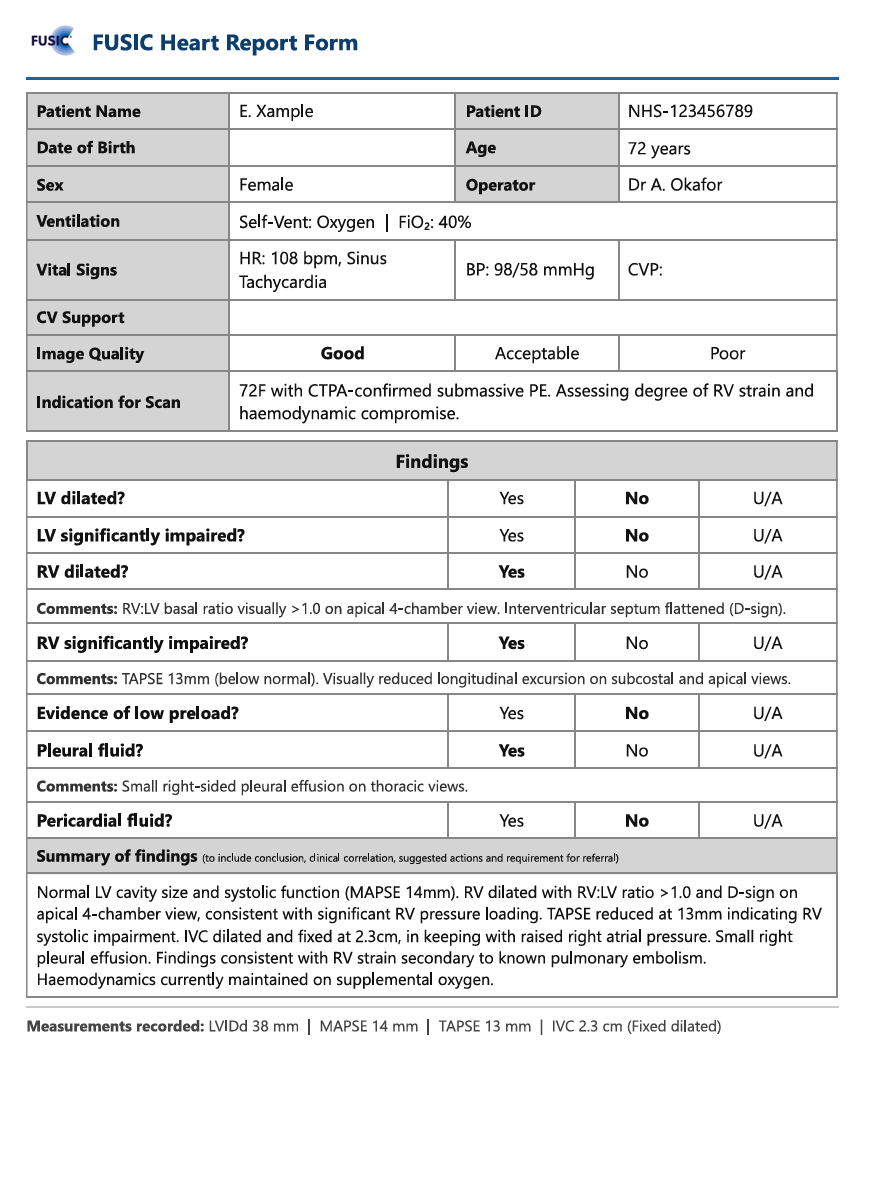
That’s the whole loop
Every tool follows the same shape, so once you know one you know them all. Nothing is uploaded — your draft lives only in this browser tab until you export it.
How your data is handled
ProbeNote was built by a clinician to provide a safe, easy to use tool that has patient confidentiality as a fundamental priority.
Nothing leaves the device
All data you enter is processed locally within your browser. No server ever receives the patient's data.
Works fully offline
The tools do not require an internet connection once they've been loaded.
No login, no tracking
There's no account to create and no analytics following you. You open the tool and start.
Cleared when you're done
Your draft is kept only for the session and wiped as soon as the tab is closed.
Anonymise before sharing
One tap pseudo-anonymises a report, stripping identifiers to help you maintain patient privacy.
Locked down by design
A strict built-in security policy blocks any attempt to send data to a third party in the first place.
For the technically curious
- Each tool is a single self-contained HTML file. There is no backend: the host serves static files, and everything you see (calculations, report assembly, exports) runs in your browser.
- PDF, Excel and plain-text exports are generated entirely client-side. The spreadsheet library is bundled with the tool and served from the same origin, so nothing is fetched from a CDN.
- A Content Security Policy on every page restricts all requests (scripts, styles, images, fonts, connections, form posts) to the tool's own origin. Data can't be sent to a third party because the browser refuses the request before it leaves your machine.
- There are no analytics, no cookies, no third-party scripts and no fingerprinting. Not as a policy: the pages simply don't contain any, and the CSP would block them if they did.
- A service worker caches the full tool on first visit, so it runs with no connection. The precache is atomic: either every file is cached and offline mode works, or none are. No half-broken states.
- Draft reports live in per-tab session storage. They survive an accidental reload, and the browser destroys them when the tab closes. Patient data is never written to persistent storage.
- The only things remembered between visits are your own settings (theme, layout, accreditation mode), stored as plain preference flags with no patient content.
- Pseudo-anonymisation replaces name and patient ID with one matching pseudo-code, widens age to a decade band, and truncates the scan date and time to month-year and AM/PM. The original values aren't retained anywhere, so the operation is irreversible.
- Pseudo-anonymisation deliberately doesn't touch free-text fields or attached images. Those are yours to review, and the tool prompts you before export.
- It's an installable PWA: add it to your home screen and it behaves like a native app, offline included.
Despite these measures, it's vital that you check with your own local Caldicott / IG team before utilising this tool in a clinical setting.